
If you need to manage your subscription or deactivate your account, the process is simple and can be done directly from your dashboard.
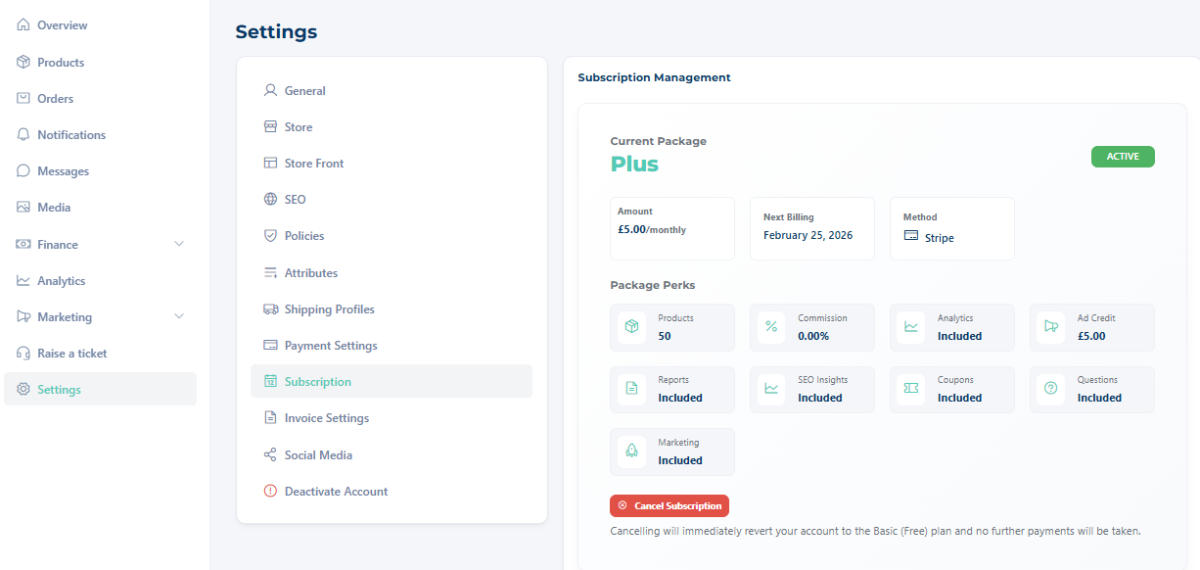
Managing Your Subscription (Plus & Premium Vendors)
If you are a Plus or Premium vendor with a paid subscription, you can manage or cancel your plan at any time.
To cancel/downgrade your subscription:
- Log into your Dashboard
- Go to Settings
- Click Subscriptions
- Cancel your active plan
Deactivating Your Account
We recommend cancelling your subscription before deactivating your account to ensure everything closes smoothly and to prevent any unintended future charges.
Don’t Worry If You Forget To Downgrade
If you deactivate your account without cancelling your subscription first, don’t worry.
Simply email us and we will:
- Check your subscription status
- Ensure your plan is updated correctly
- Make sure you are not charged going forward
We’re happy to help make the process as smooth as possible.
How to Deactivate Your Account
If you wish to close your account completely:
- Log into your Dashboard
- Go to Settings
- Click Deactivate Account
Once deactivated:
- Your account will no longer be active.
- Our system will schedule it for deletion during its automated routine clean-up process.
Please note that deactivation does not always mean immediate deletion — accounts are removed as part of our system maintenance cycle. Please note that for account deactivation all orders must be completed with none outstanding.