
Add-ons are a powerful way to customise your product listings, capture important customer details, and increase your order value—all without overcomplicating your main product options.
This guide explains when to use Add-ons, how they differ from Variations, and how to use them effectively.
What Are Add-ons?
Add-ons are optional extras or information fields that customers can fill in or select when purchasing a product.
They are best used when you need:
- Personalisation details (e.g. names, dates, messages)
- Customer uploads (e.g. photos, logos, PDFs)
- Optional upgrades (e.g. gift wrapping, add-on items, bundles)
Think of Add-ons as enhancements to a product, rather than different versions of the product itself.
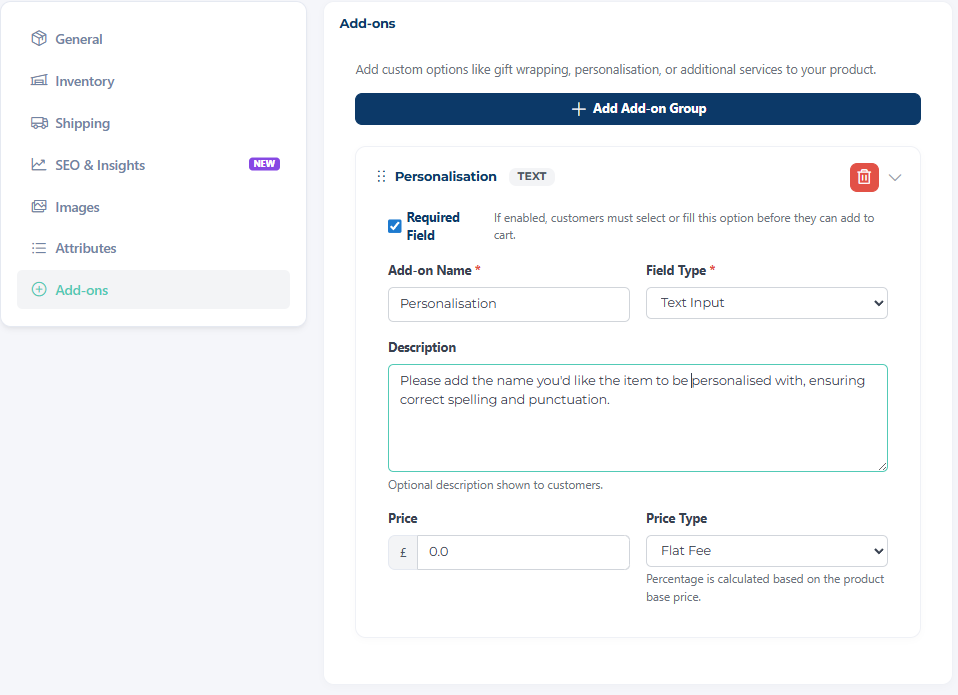
When setting up Add-ons, you have full control over what customers MUST provide and whether an extra cost is applied.
- Required Fields:
You can tick “required field” for any Add-on that is essential to complete the order.
This is especially important for personalised products (e.g. names, dates, or uploaded images), ensuring you receive all the information needed before the order is placed. - Optional Pricing:
You can also assign a price to Add-ons where an extra cost applies.
This is ideal for upgrades such as gift wrapping, premium finishes, or bundle add-ons.
Variations or Add-on?
Variations are used when you’re offering different versions of the same product that a customer must choose between.
Use Variations for:
- Size (e.g. Small, Medium, Large)
- Colour options
- Shapes or styles
- Fragrances or flavours
Variations:
- Can have their own pricing
- Can have their own stock levels
- Represent distinct versions of the product
Add-ons vs Variations: What’s the Difference?
| Feature | Variations | Add-ons |
|---|---|---|
| Purpose | Choose between product options | Enhance or customise the product |
| Required? | Usually required | Optional (can be made required if needed) |
| Stock control | Yes | No |
| Pricing | Can change base price | Can add extra charges |
| Examples | Size, colour, scent | Name engraving, photo upload, gift wrap |
When Should You Use Add-ons?
Use Add-ons when the core product stays the same, but you need extra input or want to offer upgrades.
1. Personalisation
If your product is customised for each customer, Add-ons are the best option.
Examples:
- Name on a mug or sign
- Date on a keepsake
- Custom message inside a card
👉 These usually use text fields.
2. File Uploads
If you need something from the customer to create the product, use an Add-on.
Examples:
- Photo for a printed item
- Logo for business materials
- PDF for engraving or printing
👉 This keeps everything organised and ensures you have what you need to fulfil the order.
3. Optional Extras
Add-ons are perfect for increasing order value with simple upgrades.
Examples:
- Gift wrapping
- Greeting card inclusion
- Rush order upgrades
- Matching items or bundles
When NOT to Use Add-ons
Avoid using Add-ons if the choice fundamentally changes the product itself.
For example:
- A candle in lavender vs vanilla → Variation
- A bracelet in silver vs gold → Variation
If it affects stock, core pricing, or product identity, it should be a Variation instead.
Best Practice Tips
- Keep it simple: Don’t overload customers with too many fields
- Be clear: Label Add-ons clearly (e.g. “Enter Name for Personalisation”)
- Make required fields obvious: Especially for personalised items
- Use pricing wisely: Add small charges for premium extras
- Combine with Variations: Use both together when needed (e.g. size as a Variation, name as an Add-on)
Example Setup
Product: Personalised Wooden Name Sign
- Variation: Size (Small / Medium / Large)
- Add-ons:
- Name (text field)
- Font choice (optional selection)
- Gift wrapping (+£3)
Using Add-ons alongside Variations helps you create flexible, professional listings that are easy for customers to use—and easier for you to manage.